
Documentation / Modules / Vehicle assignment
Daily vehicle scheduling
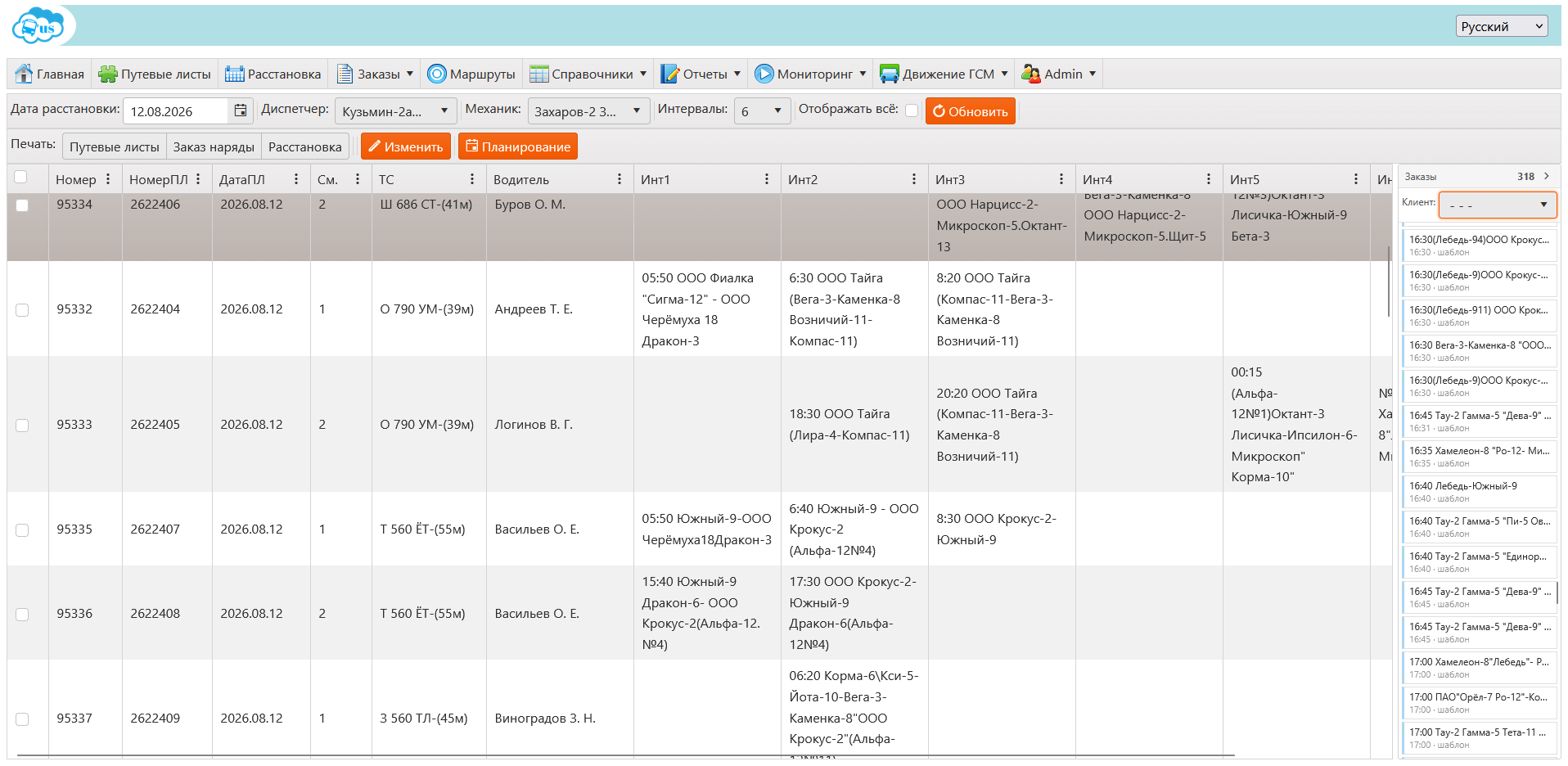
The scheduling board is the plan for the day: which bus, with which driver, on which shift runs which orders. A row is a “vehicle × shift” pair holding up to seven intervals, and every interval holds one order.
How to schedule vehicles
- Open Scheduling board in the menu and set the date.
- Pick the dispatcher and the mechanic — they go into every waybill of that day.
- Select a “vehicle × shift” row and assign a driver.
- Drag orders from the Orders panel on the right into free interval cells.
- Save the row — it issues a waybill. A row left with no orders cancels the waybill.
Schedule forecasting
- The Forecast button opens the Schedule planning window: the system suggests which order to put in which row and shows the probability of every suggestion.
- Tick the entries you want — Check all is next to them — and press Apply: everything ticked moves onto the board.
- The forecast saves nothing on the dispatcher’s behalf: moved rows stay a draft until they are saved by hand.
Tip. An order moves only into a free interval cell and only into a row whose waybill is already saved: a draft row has no waybill to attach the order to.