
Documentation / Modules / Waybills
Waybills
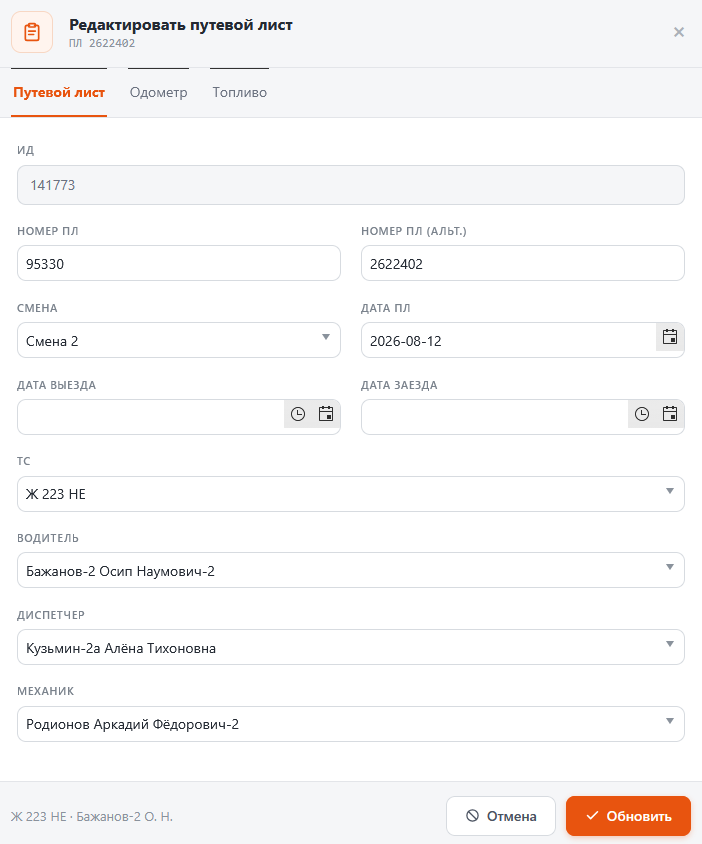
A waybill is issued for a “vehicle × shift” pair and collects the orders that vehicle runs during that shift. It also records the driver, the dispatcher, the mechanic, odometer readings and fuel.
Working with a waybill
- Open Waybills in the menu and pick a date.
- Open a waybill — its card is split into tabs: Waybill, Odometer, Fuel.
- Orders inside the waybill are handled by the Add, Move, Replace, Up, Down buttons: add a new one or pick from the list, move to another waybill, replace, and move up or down in the running order.
- On the fuel and odometer tabs enter the readings on departure and on return — consumption is calculated from them.
- Printing: Waybill form, Waybill form + driver, Order form. Selected waybills print in one batch.
Tip. The scheduling board and waybills are the same thing from two sides: a saved board row issues a waybill, and this screen lists the waybills already issued, by date.