
Documentation / Modules / Reports
Completed orders report
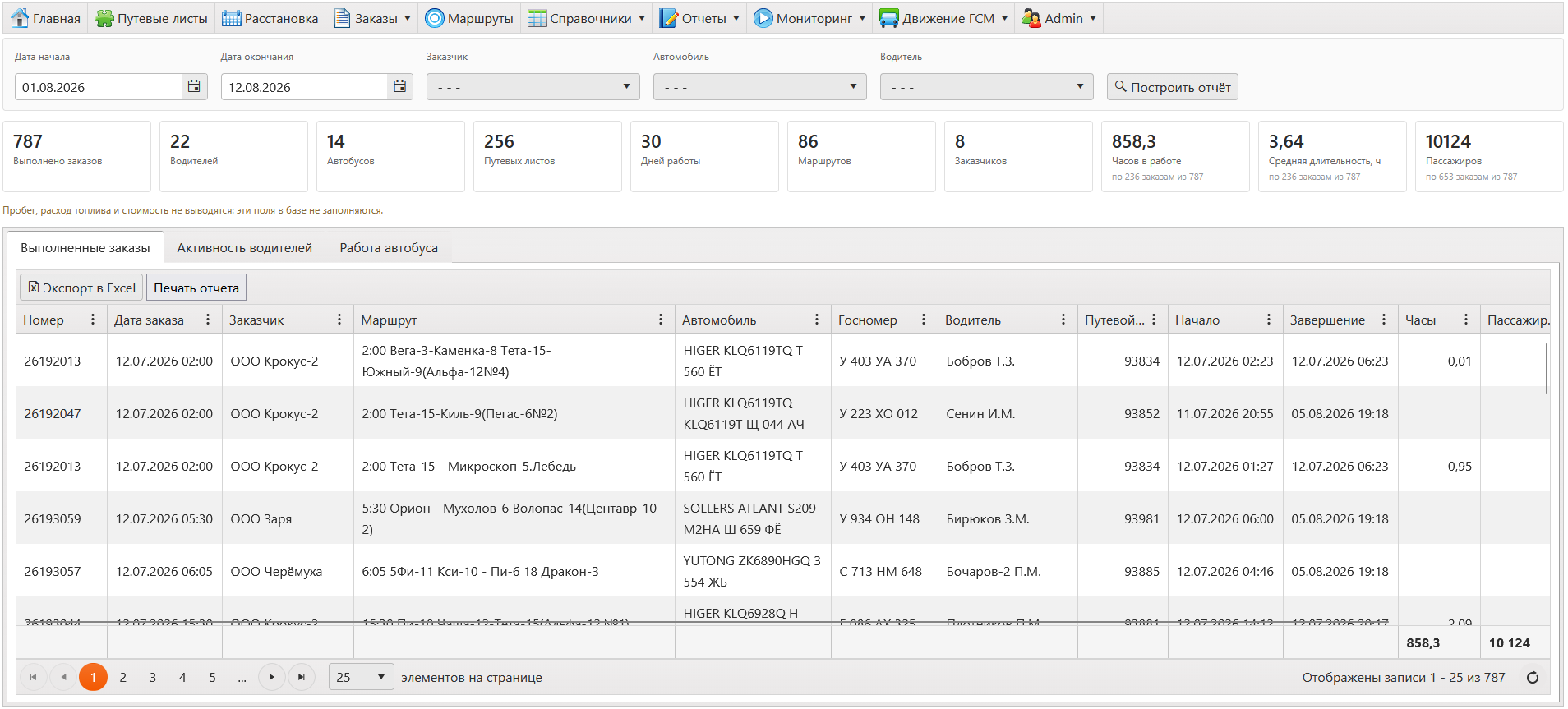
The report collects the fleet’s work over a period in three views at once: by order, by driver and by vehicle. The summary counts completed orders, drivers, vehicles, routes, customers and waybills, plus working days, hours and passengers.
Building the report
- Open Reports → Completed orders.
- Set the period: start date and end date.
- Narrow the selection by vehicle, driver or customer if needed.
- Press Build report.
- The finished report goes to Excel with To Excel or to the printer with Print report.
Three views
- Completed orders — a row per order: number, date, customer, route, vehicle and plate, driver, waybill, hours and passengers.
- Driver activity — per driver: orders, waybills, days, vehicles, routes, hours and average duration.
- Bus utilisation — per vehicle: garage number, seats, drivers, orders, hours and load in per cent.
Tip. Mileage, fuel consumption and cost are not shown: those fields are not filled in the database. The report shows what is actually there rather than empty columns.